What is Subnetting?
Subnetting refers to the process of dividing an IP network address space into smaller logical networks by “borrowing” bits from the host segment of the IP address; It enhances security and performance as node communication and broadcast messages are limited to that subnet, It also ensures address space is used efficiently.
Calculate Subnet Information
There are 4 key pieces of information we need to calculate about a subnet; the network address, the broadcast address, the host address range and the network address for the next subnet.
We will calculate the subnet network address information from a node’s IP address & subnet Mask; The first IP address we will be using is 192.168.1.2 with the subnet mask of 255.255.255.0 (or written in CIDR notation as /24, I will talk about CIDR in a different blog post)
Calculating the Subnet Network Address
This one’s quite simple; simply perform a BITWISE AND operation (If the top & bottom values are the same; write them as is, otherwise write them as a 0) on the node’s IP address and the subnet mask, In our case it would look like this;
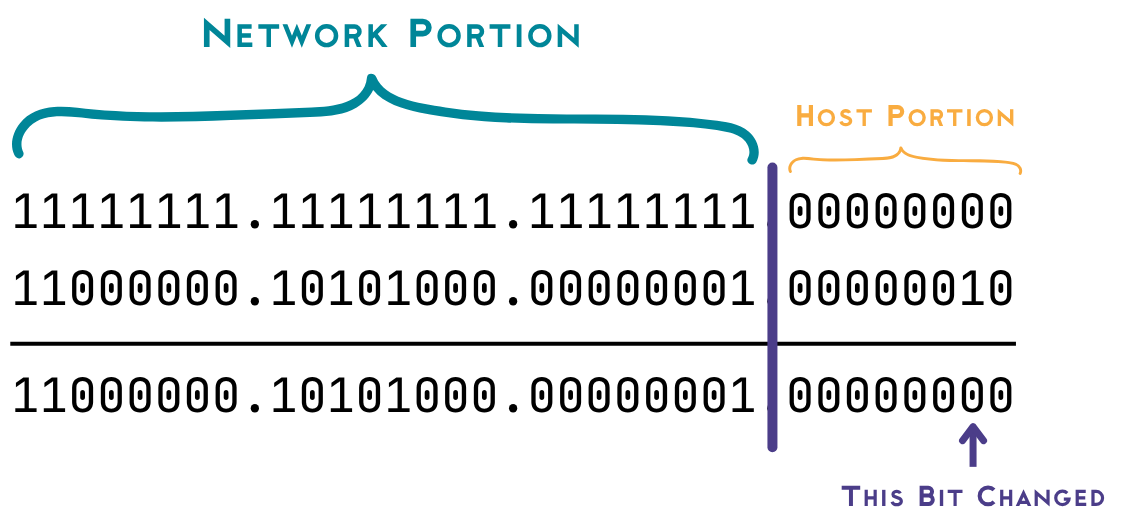 A BITWISE AND on 192.168.1.2 and 255.255.255.0
Converting 11000000.10101000.00000001.00000000 into decimal notation gives us 192.168.1.0; Voila! There’s our network address, To make this process even faster you can choose to ignore the network portion of the address (the octets denoted with a “full” subnet mask) and focus entirely on the host section.
Calculating the Subnet Broadcast Address
Now that we have the network section of the subnet it is extremely easy to calculate the broadcast address, simply write all host bits as a 1 and ignore the network section, in the case of our example the subnet broadcast address would be 192.168.1.255!
 Flip the host section 0s into 1s
Calculating the Subnet Host Range
Now that we have the subnet network address and the subnet broadcast address, it really only gets easier from here: The IP of the first host will be the network address + 1 in our case: 192.168.1.1 and the IP of the last host will be the broadcast address -1 in our case: 192.168.1.254.
So the host range is 192.168.1.1 through 192.168.1.254, inclusive
 The IP address of the First and Last Host
Calculating the Next Subnet’s Network Address
The final bit of information we need, this (like all those before) is also incredibly easy, simply network address of current subnet + 256 to calculate the network address of the next section; in our example that would equal to 192.168.2.0
 Network Address + 256 = next subnet's network address
Everything tied together
I hope you enjoyed learning about this method almost as much as I did, while it is simple I would urge you to practice more subnetting questions using this technique, https://subnetipv4.com/ is a very intuitive website to practice subnetting
Finally, Here’s all the information tied together, Have a great day ahead!
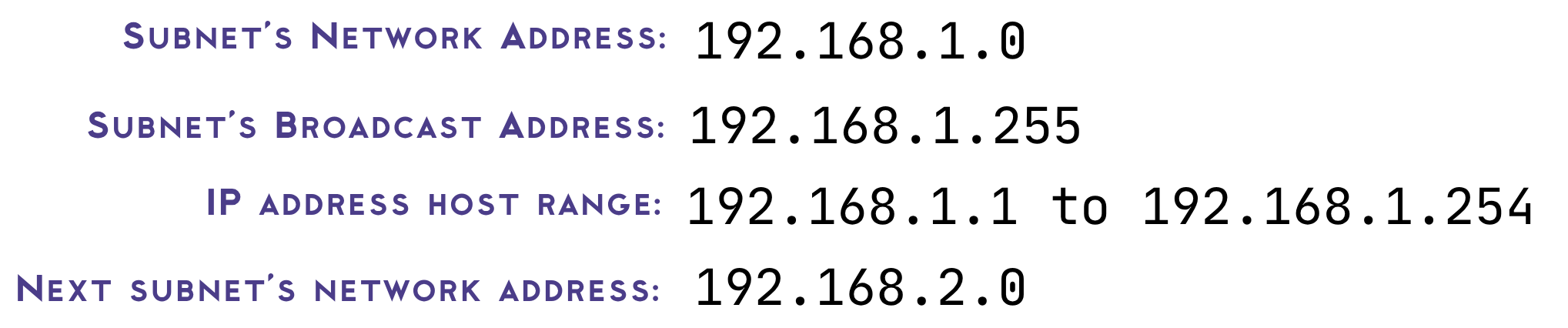 All the Information tied together